

On 23 October, as Storm Austen passed through, the city of Rouen in Normandy closed its parks and gardens to the public. In early November, an orange rain and flood warning in Upper Corsica led nineteen schools to close. For the person answering the phone that day, knowing that “it’s windy” is not enough. They need the list of closed sites and a clear answer to give.
23 Oct
Rouen closes its parks and gardens during Storm Austen
19
schools closed in Upper Corsica
Start from the question visitors ask
“Can I come this afternoon?” To answer, reception needs three pieces of information: the name of the site, the time it closes and what happens to appointments. Have them approved by the person who decided on the closure.
If another location stays open, say which one. If reopening depends on an inspection, give the time of the next update rather than an uncertain date.
Telling staff about a closure: one message for everyone
Take an organisation where only one branch closes. The central switchboard is several miles away. If nobody tells it, it keeps booking appointments. The manager can display the same notice, with dMessage, on the PCs at the closed site, the main reception and the switchboard.
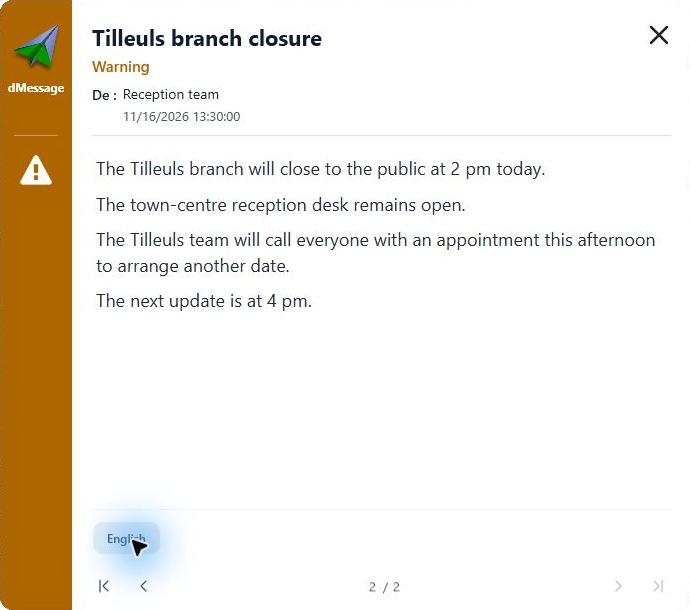
View a sample message to copy
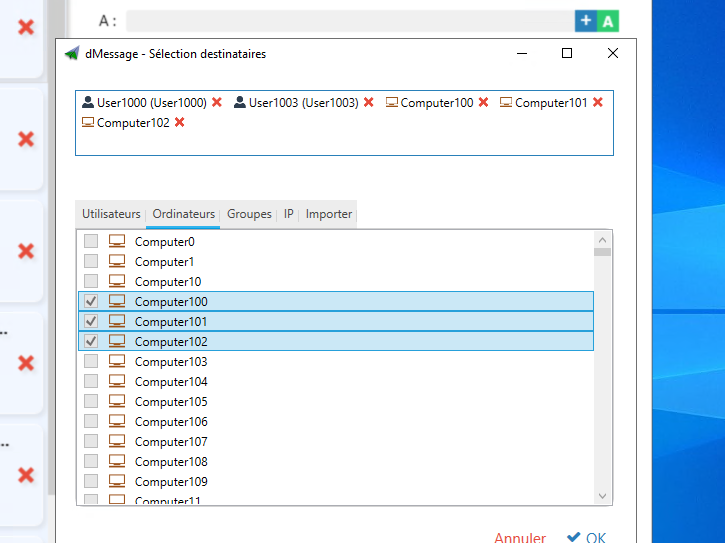
Field teams do not see the screens. Plan a phone call or a radio relay for the caretaker and staff out on rounds. Ask one person to update the opening times shown at the entrance and on the website. The same approved text then serves colleagues and the public alike.
Good habit
One person approves the messages. Two versions of the same closure do more harm than a notice sent five minutes later.
Announcing that the site is reopening
At 16:00, send the promised update, even if the inspection is not over. Once reopening is confirmed, give the date, the time and the entrances that can be used: one entrance may stay closed because of fallen branches.
Finally, think of the details that cause doubt: take down old notices and ask the switchboard to re-read the answer it gives callers.
Frequently Asked Questions
Who decides to close a site because of bad weather?
Site management, often following instructions from the prefecture or the town hall. Write down the name of the person who decides: they approve every message.
How do you warn staff who start later?
Their team leader calls them before they set off. Also leave the notice displayed on the front door.
France’s Council of State and the CAF family benefits office use dMessage
One notice, all your sites, at the same time
Target the closed site, the main reception and the switchboard in one go. Try it free for 30 days.
See how to send a dMessage notice to a particular site
Sources: City of Rouen, Storm Austen · Upper Corsica prefecture