

On 21 October, CERT Santé, which tracks cyber threats for the French healthcare sector, described campaigns of this kind. Fraudsters pose as IT support and guide the person they call to a fake Microsoft 365 sign-in page. The call sounds credible, and the person simply thinks they are helping.
How do you spot a fake IT technician?
A few signs come up again and again. The caller is in a hurry. They ask you to approve a sign-in on your phone, to read out a code received by text or to open a page whose address they dictate. Sometimes they also give a number “to call back”, which leads to their accomplices.
Real IT support never needs your password or your sign-in code. That is the sentence the whole team should remember.
The message to send as soon as the first call is reported
As soon as a suspicious call is reported, warn the departments likely to be called next. The message must still help someone who already has the phone to their ear: it says what to do, right now.
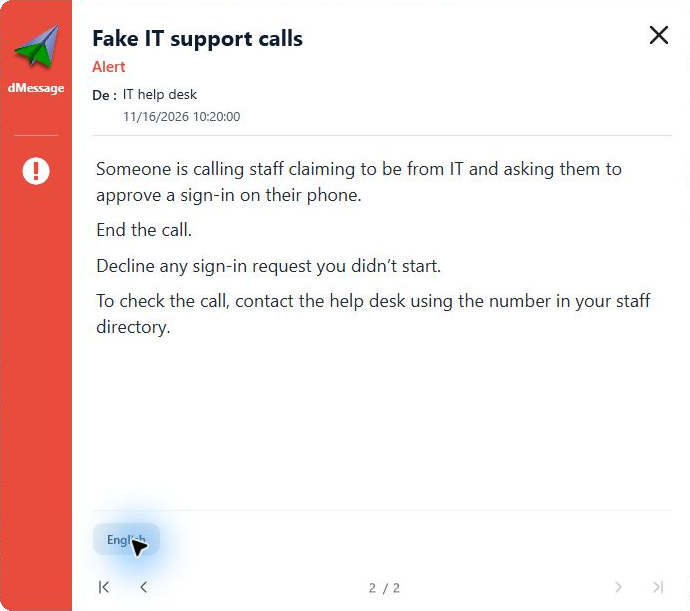
View a sample message to copy
Describe the request heard on the phone, but do not copy the fake site’s address. Someone might click out of curiosity. For colleagues away from their screen, the head of department can repeat the same words in person.
Good habit
Put the real IT support number in every alert. It is the only number your colleagues should call.
Someone has already answered: what now?
Anyone who typed their password or approved a request on their phone must be able to say so straight away, without fear. Ask them to call the real IT support through the usual channel, give the time of the call and describe what they did. IT support does not need their password to act.
And thank them. The colleague who raises the alarm helps the whole team recognise the next call.
Frequently Asked Questions
Can IT support really ask me to approve a sign-in?
An approval request should match a sign-in you have just started yourself. If you did nothing, decline it and warn IT support on its usual number.
Should you warn the whole company or just one department?
Start with the departments receiving the calls, often reception and teams whose numbers are public. Widen the warning if more reports come in.
Béziers and Saumur hospitals use dMessage
Warn reception before the next call
A ready-to-use template, sent to the right departments in a few clicks. Free 30-day trial.