

Two kinds of calls to expect
Worried patients want to know whether their data is affected and what they should do. Other calls come from fraudsters. At Foch Hospital, near Paris, payment reminder letters were exposed, and the hospital identified a risk of payment fraud.
A fake letter that quotes a real file number inspires trust. The patient then calls reception to check, or pays without checking.
8 Nov
Reims University Hospital is told of the breach
16 Nov
the GRIM group confirms unauthorised access
4 points
in the reception answer
A shared answer, written and approved
Reception staff should not have to improvise. Prepare a short answer with management, the data protection officer and the communications team. It covers four points.
- What happened, in one sentence, with no technical detail.
- What the hospital never asks for: a bank code, a password, an urgent payment by link or by phone.
- The only way to check an invoice: the usual billing department number, or the known patient portal.
- Where to report a suspicious letter or call.
“We have been informed of an incident at one of our suppliers. We will never ask for your bank details by phone, text message or email. To check an invoice, call our billing department on the number shown on our website.”
Trap
Confirming a payment over the phone to reassure a patient. That is exactly what fraudsters are after.
Warn every team at the same time
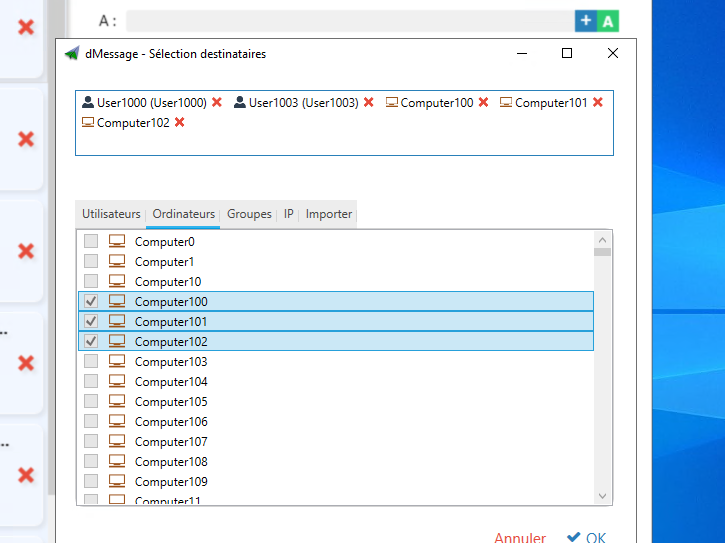
The answer must reach reception, medical secretaries, billing and the switchboard at the same time. Otherwise, two patients get two different versions.
With dMessage, this message appears on the PCs of the targeted departments, by Active Directory group. The read receipt shows which recipients have read it. A secretary’s office that has not seen it can be called directly.
Keep the instruction up to date
Information changes: the number of people affected, new types of fraud, the opening of a dedicated phone line. Send a new message with each change, and remove the old answer from the reception binder.
Some claims circulate before anything is confirmed. A medical appointment platform was the subject of a claimed data sale that had not been verified at the time of writing. Instructions to staff should stick to what the hospital has confirmed.
In France, patients targeted by a scam can find help on Cybermalveillance.gouv.fr.
Good habit
Date the printed answer. Reception can see at a glance whether it has the latest version.
Béziers and Saumur hospitals use dMessage
Send the same answer to every department, at the same time
Try it free for 30 days: target reception and billing, then check the read receipts to make sure everyone has seen the instruction.
Warn the team about a fake IT support call · Plan internal communication for an incident
Sources: France 3 Grand Est, Reims University Hospital · Cyberattaque.org, Foch Hospital · Cyberattaque.org, GRIM group · Cybermalveillance.gouv.fr