

The global Microsoft 365 outage began on the evening of Thursday 12 November. The next day, several million users could not open their mailbox. Microsoft blamed a technical problem and ruled out a cyberattack. In many companies, the same question came up: if we warn colleagues by email, when will they read it?
Email outage: what should the first message to staff say?
Start with what the help desk has checked. If only the Lyon offices are affected, say so. Other sites will not restart their PCs for nothing.
Then answer the question everyone is asking: how do we keep working in the meantime? For urgent requests, give a simple way to reach a colleague, such as their usual phone or an internal number everyone knows. Check that it works before you share it.
If the internal network is working, the help desk can display a dMessage window on the PCs of the departments concerned. Here is what someone at reception would see.
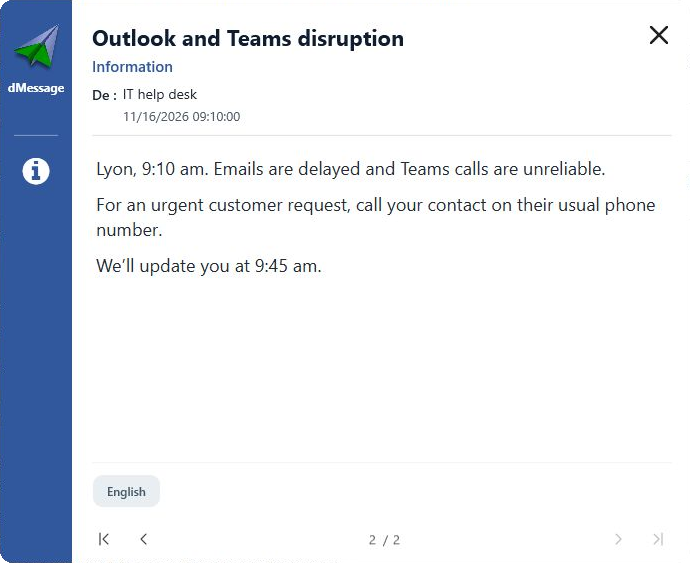
View a sample message to copy
Avoid
Sending an email to say that email is down. It happens more often than you might think.
Communicating without email: keep to the time of the next update
At 9:45, teams want to know whether they can go back to normal. If the answer is still “not yet”, say so anyway and give the time of the next update. Silence makes people think either that everything is fixed, or that nobody is dealing with it any more.
Also think of people who are not in front of a screen: technicians on call-outs, sales staff at meetings, workshop teams. Team leaders can call them or send a text. And if the internal network is down too, switch to the phone or to the local relay planned in each department.
Announcing the service is back without causing confusion
Before announcing the recovery, run a simple test: one colleague sends a new message and another confirms they received it. If new emails get through but older ones are still stuck, say so.
The switchboard will then know what to tell the next customer who calls. Teams will know that a message sent at 8:00 may still arrive late in the morning.
Good habit
Prepare an “email outage” template today. On the day, you will only need to change the time.
Frequently Asked Questions
Should you warn colleagues by text during an Outlook outage?
Text messages work for a small team whose numbers you know. For several hundred people, a message displayed on PCs over the internal network is easier to target and to update.
What if the internal network is affected too?
Go back to the phone and team leaders. Prepare this list in advance, on paper: it is what you will rely on the day everything else is down.
More than 300,000 users protected by dMessage
Warn your teams even when Outlook stops responding
dMessage runs over your local network, not through email. Try it free for 30 days on a few PCs.
Three message templates to announce an interruption and the recovery
Sources: franceinfo, global Microsoft 365 outage · Université Côte d’Azur IT department notice