

Tracking message reads
Read receipts: knowing who has seen an urgent alert
Sending an instruction is not enough. After a security alert or maintenance notice, you need to know who has read it and whom to follow up with. dMessage records every read.
What the read receipt shows
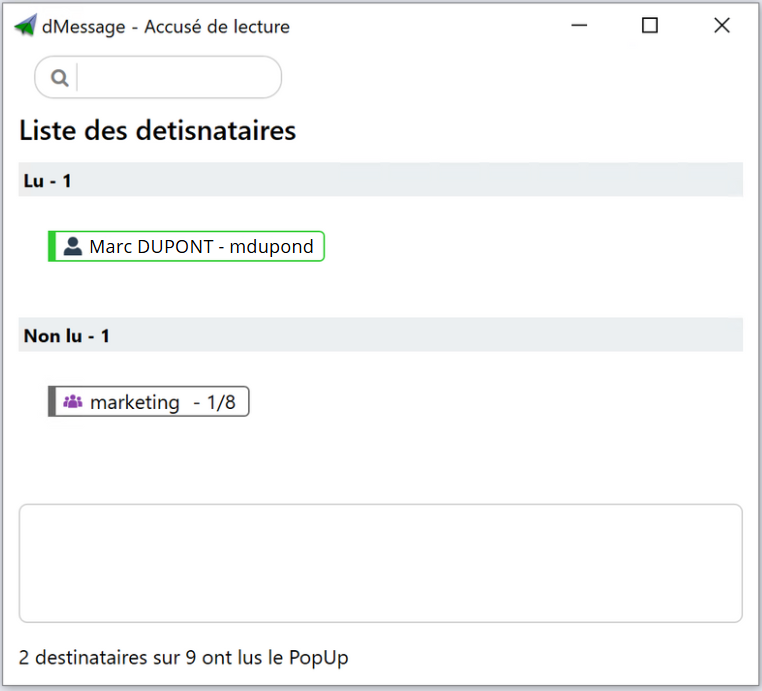
For each message, the receipt window separates the recipients who have read it from those who have not yet. For a group, it shows how many members have read it.
What a receipt proves, and what it does not
| The receipt proves | It does not prove |
|---|---|
| That the window was displayed and read on the PC. | That the instruction was understood or applied. |
| The time of reading, per recipient. | That someone away from their PC has been informed. |
Good habit
For a critical instruction, ask for a verifiable action as well as the read: “confirm on 4400 that the door is closed”.
Follow up only with those who have not read it
A general reminder tires those who have already read it. With the list of unread recipients, the manager calls or resends the message only to those concerned.
After the incident, the list also serves as a record: who was warned, and at what time. It is useful for a lessons-learned review or an audit.
Frequently Asked Questions
Are Outlook read receipts enough?
They depend on the recipient, who can decline to send them, and on email, which may be down. A receipt recorded by the alert software does not depend on that choice.
Can you see reads for a whole group?
Yes. The window shows, for each group, how many members have read the message.
Since which version are receipts available?
Read receipts arrived with dMessage 10.5.
Safran, Amundi, France’s Council of State and more than 300,000 protected users
See who has read your first message
Send a test message to a small group during the free 30-day trial, then open the receipts.
See also: Visible alerts and read tracking · Targeting Active Directory