

Choosing recipients
Active Directory targeting: the right message to the right people
Your directory already knows who works in which department and on which PC. dMessage uses it to send each alert only to the people concerned, with no list to maintain.
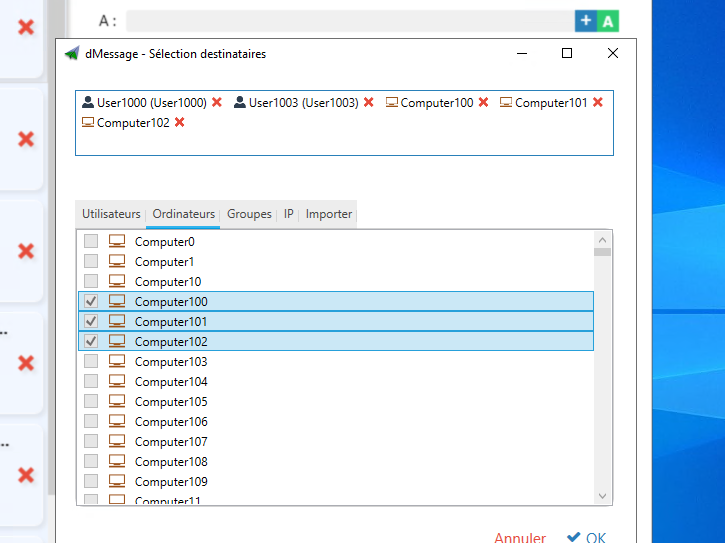
What you can target
- Users. One person, wherever they are signed in.
- Computers. The reception PC or the PCs in a room, whoever is signed in.
- Groups. A department, an on-call team, a pilot group, including nested groups.
- Organizational units. A site, a building, a branch.
Going further with reception conditions
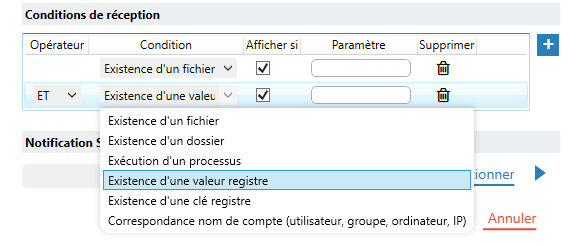
Sometimes the group is not enough. Reception conditions show the message only on PCs where a file, a folder, a process or a registry key exists.
Example: an accounting application maintenance notice only appears where that application is running.
Good habit
Create alert-specific groups in the directory: “Reception, all sites”, “IT on-call”. You then reuse them for every instruction.
Secure connection to the directory
Directory queries can use LDAP over SSL. Everything stays on your network.
Frequently Asked Questions
Does dMessage handle nested groups?
Yes, since version 10.5: a group that belongs to another group also receives the message.
Do you need to maintain a separate list of PCs?
No. Recipients come from your existing Active Directory.
Can you send to a PC rather than a person?
Yes, for example to a shared reception PC, whoever is signed in.
Safran, Amundi, France’s Council of State and more than 300,000 protected users
Send a message to your first group
The trial version connects to your directory. Free for 30 days.
See also: All features · Reading Accused