

Panic button on the workstation
Silent alert: a panic button on the reception PC
A visitor becomes aggressive at the counter. The member of staff presses a key combination and, a few seconds later, security sees on screen where to go. Nothing changes on the reception screen.
What is a silent alert?
A silent alert warns colleagues without the threatening person noticing: no siren, no visible phone call. It is used at reception, at counters, in bank branches, in emergency departments and in social services.
Keyboard shortcut or desktop shortcut
- Keyboard shortcut. A key combination triggers a prepared message, even when another application is open.
- Desktop shortcut. An icon sends the message with a double click, without opening the console or typing anything.
- Recipients set in advance. The manager, the security team or the guard post: nobody else gets the alert.
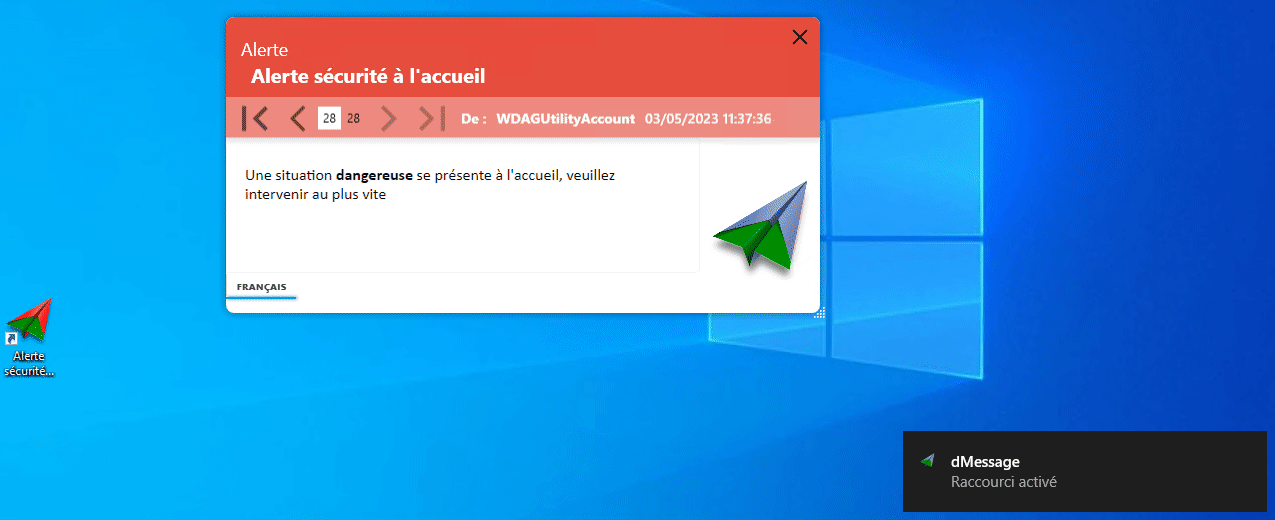
Prepare the message to save seconds
The alert must say where to go, without the member of staff having to type. Prepare one shortcut per workstation: “Help needed at building A reception”, “Aggressive customer at counter 3”.
Good habit
Test the shortcut once a quarter with the security team, at a quiet time. A reflex that is never used is forgotten.
Good to know
The alert reaches Windows PCs running the agent and connected to the network. For staff working alone at night, also plan a lone-worker protection device.
Frequently Asked Questions
What is the difference between a silent alert and a panic alarm button?
A panic alarm button is dedicated hardware. A software silent alert uses the PC already on the desk, with no extra hardware.
Who receives the alert?
The recipients chosen when the shortcut is created: a person, an Active Directory group or a specific PC.
Does the reception member of staff see anything?
Triggering is discreet: only a small notification confirms the alert was sent.
Béziers and Saumur hospitals use dMessage
Create your first alert shortcut
Test it with your security team during the free 30-day trial.
See also: Case study: keeping reception staff safe · Delegating sending with a desktop shortcut