

Enterprise alert software
Alert software that appears on the screen of every employee concerned
IT incident, safety instruction, maintenance: dMessage displays your alert on top of everything on the Windows PCs of the people you choose, within seconds, and tells you who has read it.
What is enterprise alert software?
Alert software sends a priority message straight to employees’ screens. Unlike an email, it does not sit in an inbox: the window opens on top of the applications in use.
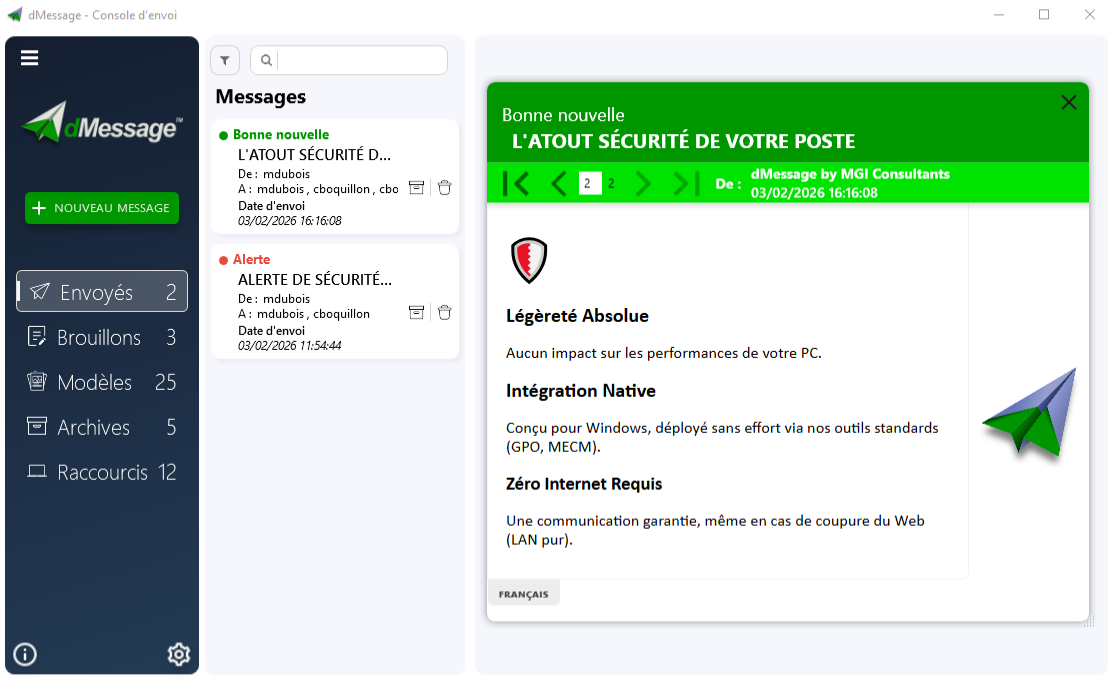
With dMessage, the alert leaves the console and reaches Windows PCs running the agent. Everything runs over your local network: no cloud, no dependence on email or the internet.
What dMessage does
- Precise targeting. Active Directory users, computers, groups and organizational units, including nested groups.
- Know who has read it. Read receipts list the recipients who have seen the message and those to follow up with.
- Prepare in advance. Message templates, scheduled and recurring sends, shortcuts to trigger an alert in one action.
- Filter reception. Show the message only if a process is running, if a registry key exists or outside PowerPoint presentations.
- Speak everyone’s language. Several versions of the same message in language tabs.
When should you use alert software?
| Situation | Example message |
|---|---|
| IT outage | “Order validation is blocked in Lyon. Next update at 9:30.” |
| Planned maintenance | “The file server will be down from 12:30 to 13:00. Please save your documents.” |
| Cybersecurity | “A fake technician is calling departments. Hang up and call the help desk on 4455.” |
| Personal safety | “Help needed at reception.” sent by shortcut to the security team. |
| Site closure | “The Les Tilleuls branch closes at 14:00. Send visitors to the town centre.” |
Good to know
dMessage complements your alarms, sirens and text messages: it does not replace them. It reaches people at a Windows PC running the agent and connected to the network.
On-premise installation, no cloud
Installation takes three steps: a shared folder for messages, the agent on receiving PCs, the console on sending PCs. Agent deployment can be automated through Group Policy or your software distribution tool.
Data stays on your network. That is a deciding factor for hospitals, public bodies and banks.
Frequently Asked Questions
Does alert software work without the internet?
dMessage does: it runs on your local network. An email or internet outage does not stop sending, as long as the internal network works.
Can you target a single department?
Yes. You choose an Active Directory group or organizational unit, a computer or a person. Other PCs receive nothing.
How do you know the alert was read?
Read receipts show who has read the message and who has not seen it yet. You can follow up with just those people.
How long is the trial?
The trial version is free for 30 days from installation.
Safran, Amundi, France’s Council of State and more than 300,000 protected users
Test a first alert on three PCs
Install the trial version, send a message to a small group and check the read receipts. Free for 30 days.
See also: Send a message to every PC · IT outage notification · Silent alert and panic button