

Head offices, offices, reception desks
Companies: protecting reception and warning every office
A visitor becomes aggressive at the desk, someone collapses in the lobby, a suspicious parcel arrives: reception staff must be able to call for help without being noticed. And the whole company must receive the day’s instructions on its PCs.
Reception staff, the first in line
Reception sees every visitor, often alone. When a situation gets out of hand, picking up the phone in front of the person can make it worse.
With dMessage, a keyboard shortcut or a desktop icon sends a prepared message to security or a manager. Nothing changes on the reception screen, apart from a small notification confirming it was sent.
| Situation at reception | Prepared message |
|---|---|
| Aggressive visitor | “Help needed at hall A reception.” |
| Someone collapses in the lobby | “Someone has collapsed at reception: call the first aider.” |
| Suspicious parcel | “Suspicious parcel at reception. Do not approach. Security needed.” |
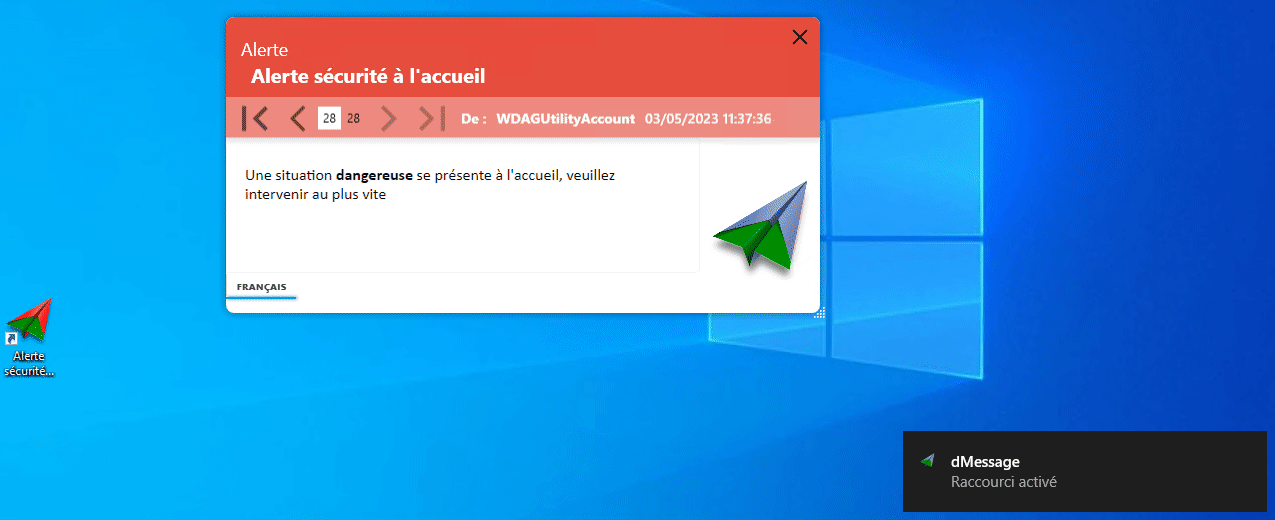
Good habit
One shortcut per situation, and a drill every quarter with the security team. The action must become automatic.
The whole company, informed on its PCs
- IT. Outages, maintenance, fake help desk calls.
- Safety. Evacuation, fire alert, closed access.
- Organisation. Works, a department moving, an unplanned closure.
Frequently Asked Questions
How do you protect a reception member of staff working alone?
With a discreet, prepared way to raise the alarm: a shortcut on their PC that warns security, tested regularly.
Can the alert go to several people?
Yes: an Active Directory group, for example the security team and the site manager.
More than 300,000 users protected by dMessage
Create your reception alert shortcut
Test it with your security team during the free 30-day trial.
Examples: Reception staff: one-click alerts · Silent alert · Delegating sending to the site manager