

Getting the student portal update to the front desk
The exams office already has a way to reach students: the campus portal. At reception, the person giving directions may not have the year group’s timetable open. A dMessage notice on their PC gives the group, exam, time and both room numbers. They can answer, “Are you in group B? Your 9 a.m. economics exam is in B214.”

Exam room change
Information
From: Examinations office
Economics · Group B
Room B214
Thursday 19 November at 9 am. The room on the original notice, A105, has changed.
The student portal shows the new room.
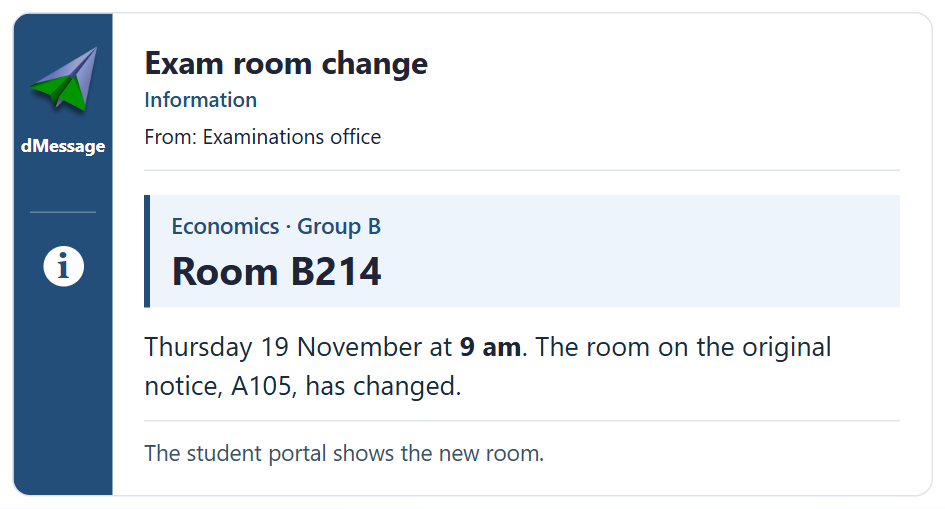
Including the old room helps explain why the printed notice says A105 and saves the student a walk back to check. The group matters, too: another economics exam could be taking place elsewhere on campus at the same time.
Two ways to word the same room change
On the portal, the notice speaks directly to the students affected: “Group B economics. On Thursday 19 November at 9 a.m., your exam will be in B214 instead of A105. The start time is unchanged.”
For staff, the exams office can limit the notice to the Windows PCs running dMessage at reception and in the relevant offices. An invigilator already outside A105 can hear about the change through their usual exams office contact and direct students who arrive at the old door. Once candidates are in their seats, the notice can come off staff screens before the next exams.
The Poitiers education authority uses dMessage
Room change notices on campus PCs
The 30-day trial lets the exams office send its own notices to the desks involved.