

Pop-up message over the network
Sending a message to every computer on the network: the 4 methods
Warning every PC before an outage, a department before maintenance, a colleague before a restart: here is what Windows, PowerShell and dedicated software can do, and where each one stops.
The 4 methods at a glance
| Method | What it does | What is missing |
|---|---|---|
| net send | A message to a PC or a domain, on old Windows versions. | Removed since Windows Vista. |
| msg.exe | A message to the sessions of a PC or a session host. | One PC at a time, no receipt, not in Windows Home. |
| PowerShell | msg.exe run on several PCs through Invoke-Command. | Requires WinRM and administrator rights, plain text, no tracking. |
| Dedicated software | An Active Directory group, a ready template, a visible window. | An agent to install on the PCs. |
With Windows alone: msg.exe
The msg command replaced net send. It sends text to the sessions open on a PC or a server, provided you have the Message permission.
For a one-off message to one person, it is often enough. For a whole department, you have to repeat the command PC by PC.
With PowerShell: several PCs at once
PowerShell can run msg.exe on a list of PCs, for example every computer in an organizational unit. The script works if WinRM is enabled everywhere and your account is an administrator on the PCs.
Limit
Neither msg.exe nor PowerShell tells you who read the message. “Sent” only proves the command ran.
With dedicated software: a group, a template, tracking
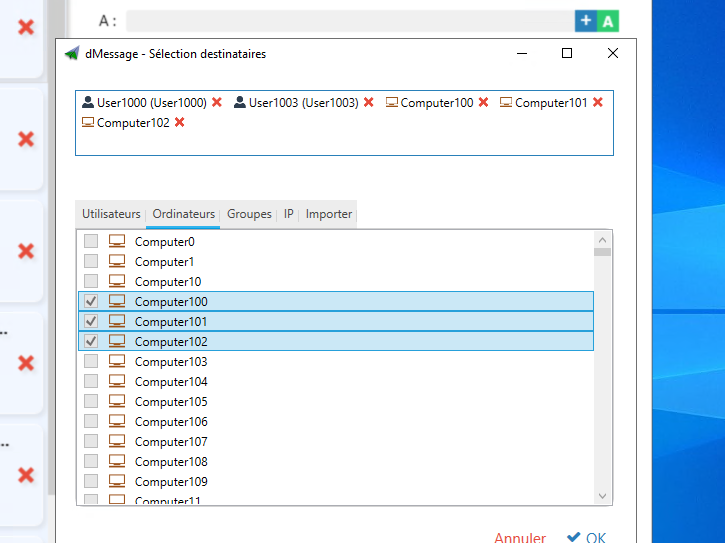
In dMessage, you pick the Active Directory group, reuse a template and send. The window appears on top on the PCs running the agent, then the read receipts fill in.
Frequently Asked Questions
How do you send a message to every computer in a domain?
With Windows alone, you have to loop over the list of PCs with msg.exe or PowerShell. Software such as dMessage targets an Active Directory group or organizational unit directly.
Why does msg.exe not work on some PCs?
The command does not exist on Windows Home, and remote sending requires the Message permission and network access to the PC.
Does the recipient need to install anything?
Not with msg.exe. With dMessage, a light agent is deployed once on the PCs, for example through Group Policy.
Safran, Amundi, France’s Council of State and more than 300,000 protected users
Send your first message to a group
Try dMessage free for 30 days: one pilot group, one template, and the list of who has read it.
Detailed guides: Alternative to Net Send · The Windows MSG command · Show a message with PowerShell