

Change management: why three messages are enough
New software rarely fails for technical reasons. It fails when users do not know when to start, where to click or whom to ask for help.
Three short messages, sent only to the people involved, answer those three questions. The rest of the company is not disturbed.
One week ahead, the twelve participants get their invitation
The Purchasing lead selects the pilot group in dMessage. He can prepare the announcement before the launch meeting and schedule it to appear on the team’s workstations.
Lille Purchasing · First session on Monday at 9:00 a.m.
We’ll take fifteen minutes to create a practice purchase request. By noon on Friday, please open “Purchasing – Training” from your usual portal. If the home screen doesn’t open, you can reach your Purchasing lead on extension 4210.
On Monday morning, the notice names the right environment
A buyer signs in and finds two tools available. The dMessage notice tells her which one to use for the exercise and when to stop.
Lille Purchasing · Your first training draft
In “Purchasing – Training”, create a request for two ring binders and leave it as a draft. The exercise ends at 11:00 a.m. and won’t place a real order. Keep using the usual tool for today’s purchases. Your pilot lead can help on extension 4210.

Purchasing pilot is open
Information
From: Purchasing project team
Lille · Pilot group
Purchasing – Training
The first exercise is a draft purchase request. Live orders stay in the usual application.
Purchasing contact · extension 4210.
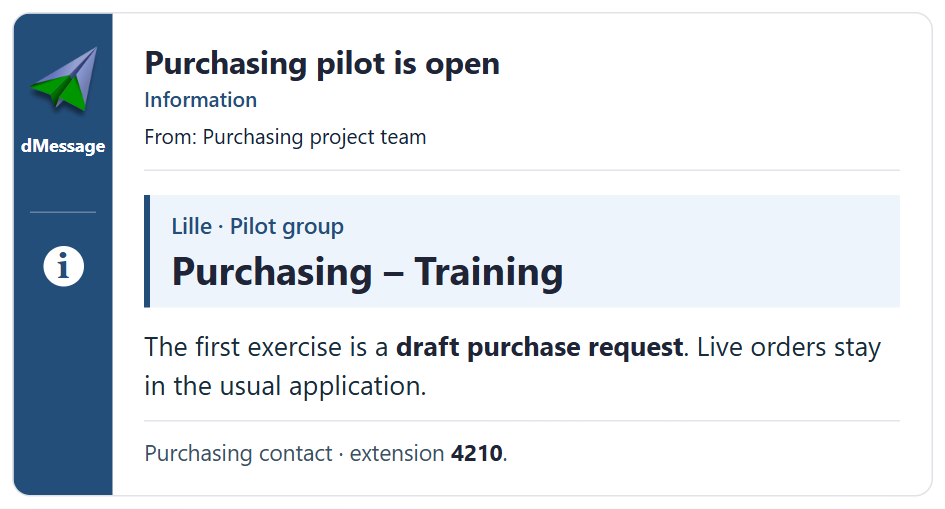
Before sending, the project team can preview the notice as it will appear on the workstation. It’s easy to check whether the tool name and the help number stand out. See the dMessage editor and preview side by side.

Wednesday’s update covers what the team managed to do
In dMessage, the pilot lead can see who confirmed reading the announcement. In the training tool, he can see how many colleagues created a draft. That gives him enough information to share the results with the group and offer individual help to anyone who got stuck.
Nine colleagues have created their drafts. We’re fixing access for two people, and one colleague returns tomorrow. We’ll call the people concerned by 10:00 a.m. on Thursday. In the next exercise, we’ll add a supporting document to the draft. Thanks for your feedback.
You can try the announcement on a few workstations running dMessage before opening the pilot. The 30-day dMessage trial starts at installation.
Good habit
Start with a pilot team of ten to fifteen people. Their questions write the messages for the full rollout.
Frequently Asked Questions
How long before the rollout should you tell users?
A week is enough for a pilot team: long enough to check access, not long enough to forget the date.
Should the message go to the whole company?
No. Target the Active Directory group of the people involved. Everyone else carries on with the usual tool without unnecessary instructions.
More than 300,000 users protected by dMessage
Support your next pilot team
Send the three rollout messages to a test group during the free 30-day trial.